

The offer came back signed on Monday morning.
You know what this week looks like. Two hours rebuilding the checklist. A welcome email written from scratch for the twelfth time. Three reminders to the manager about booking the intro meetings, the last one slightly less polite.
Now think about how you'd handle this if you had someone to hand it to. Someone who'd read your process doc, knew the department's plan, knew your tools. You'd say one sentence: "New product manager, starts June 1, reports to K., set everything up." And they'd come back with the full plan for you to check before anything went out.
That handoff is what this lesson builds. Not the someone, the sentence. Last lesson you wrote down how onboarding works, in documents Claude can read. Which means the whole setup, the task list, the emails, the schedule, the invitations, can now be generated from those documents and handed to you for review. Your job shrinks to the part that was always yours: checking it, correcting it, approving it.
And don't worry about how it's built. The method is already written down and published. You install it once as a skill, run it, and teach it your corrections. Every hire after this one starts with a single line.
Before you start
Four things need to exist:
→ The context docs from Documenting the onboarding process. processes/onboarding.md, plus the department doc for the role you're hiring. The plan is generated from these. No docs, no plan.
→ Your task tracker connected. Monday, Asana, Trello, whatever your company already uses for work. This is where the plan's tasks will live, because a plan nobody's tools can see is a plan nobody follows.
→ Calendar and email, connected since Module 1. The invitations and the welcome email need them.
→ The Effy AI connection, from Basic setup, identity and your AI policy. The plan method comes from Effy's HR skills library. To set it up:
1. Sign up for a free account. No credit card, nothing to set up. Name and email, just so the account exists.
2. Connect it to Claude:
- On a personal Claude plan: open Connectors in settings, add Effy AI + https://go.effy.ai/mcp, and approve the access.
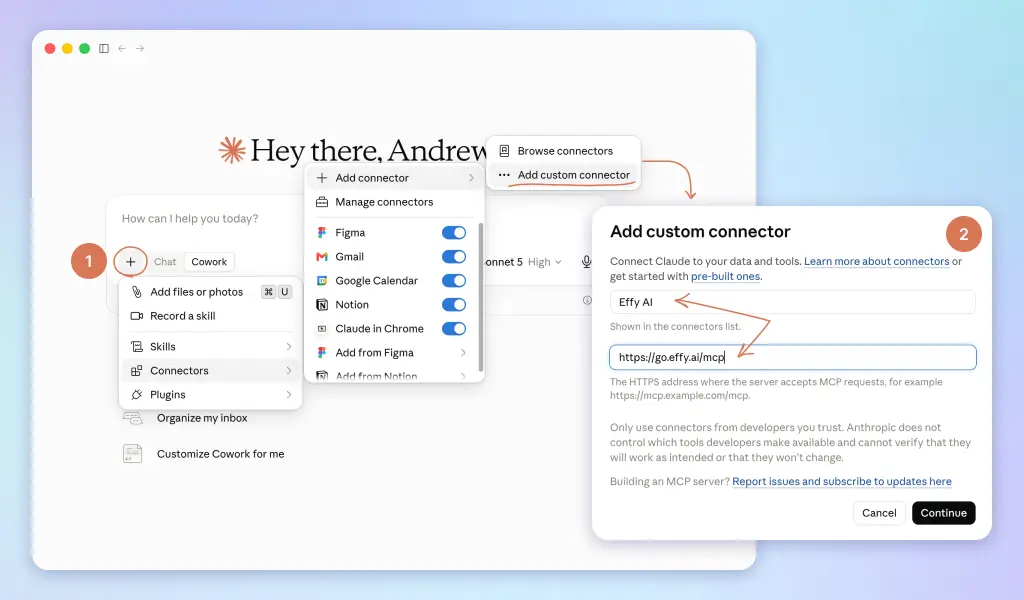
- On Team or Enterprise, your admin controls which connectors you can add. Send them this, then connect as above once it's allowed:
Could you enable the Effy AI (https://go.effy.ai/mcp) connector with our Claude workspace? It's a HR tools and skills library I'll use for People work.
Using ChatGPT or Copilot instead of Claude? They connect tools their own way, through their own guides. Step-by-step instructions for both will be added here soon.
One real hire helps too. This lesson works best run on an actual person starting soon, not a test dummy. If nobody's starting, use your most recent hire and pretend the clock is three weeks back.
What you'll have at the end
A skill called onboarding-plan. You give it five facts: role, department, manager, start date, country. It produces the pack:
→ Tasks in your tracker. One project per hire. Every task assigned to exactly one owner, with a due date counted from the start date.
→ The welcome email, drafted in your voice, because Module 1 taught Claude what your voice is.
→ The first-week schedule, built from the department doc's meeting list.
→ The manager's 30/60/90 draft, following the arc from Documenting the onboarding process: learning, then contributing, then owning. Marked draft, because the manager owns the goals.
→ Copies of the new-hire documents. The welcome deck, the first-week doc, whatever the copy list in your process doc names, duplicated from the masters and renamed for the hire.
→ Calendar invitations, sent as one reviewed batch: the day-1 welcome, the intro meetings, the recurring 1:1, the buddy lunch, and the 30/60/90 check-ins.
One line for the chapter: one signed offer in, a scheduled plan out, and nothing written from scratch.
Set up the room first
Module 1's rule: one project per HR job. Onboarding is a job. It gets a room.
Create a project called Onboarding plans. From now on, every hire's plan gets built in here, and that's the point: a project accumulates context, so hire twelve benefits from everything you corrected on hires one through eleven.
Three parts to set up, five minutes total.
The instructions. Paste this into the project's instructions field:
This project builds and runs onboarding plans. Every new plan follows the build-an-onboarding-plan playbook from Effy's HR skills library. Use the current version, every time. Before any task, read processes/onboarding.md and the department doc for the role in my Claude-HR folder. Follow ai-usage-policy.md in everything: roles and initials, never full names. Every plan follows the same order: build the review pack, show me, push to other tools only after I approve. Messages and emails are
drafts. I send. One chat per hire, named by role and start date.
Notice what's not in there: the process itself. The instructions point at the docs from Documenting the onboarding process, they don't copy them. Pointers, not copies, same as always.
The memory. As you work, tell Claude to remember the corrections that should apply to every future hire: "remember: welcome emails sign off from me, not from HR," "remember: we stopped doing office tours." Standing facts about how you run onboarding go in. Anything about a specific person stays out, and so does anything the data note says is sensitive. Memory is for the process, chats are for the hires.
The convention. One chat per hire, named by role and start date: "PM, June 1." When the same hire comes up three weeks later, you reopen their chat and the whole history is sitting there, which is exactly what the chasing in Running it: monitoring, chasing, and the check-ins will lean on.
One line: the project is the room where onboarding lives, and it gets smarter with every hire who passes through it.
Install the method as a skill
The method for turning your docs into a plan is not something you have to work out. It's written down in Effy's HR skills library, the same place the Documenting the onboarding process method came from.
You could ask Effy for it fresh every time someone's hired. Don't. A written-down way of doing one task, used repeatedly, is exactly what From one-off prompts to autopilot called a skill. So install it once, in the Onboarding plans project:
"Effy, save the build-an-onboarding-plan playbook as a skill called onboarding-plan. This is the method for every new hire's plan."
What the playbook holds is the discipline you'd otherwise have to remember under time pressure: read both context docs first and stop if one is missing, one owner per task, real dates counted from the start date, gaps flagged instead of guessed, and a hard rule that nothing touches another tool before you've approved the pack.
And you've already seen the playbook named once before: in the project instructions you pasted earlier. That's deliberate. The skill is the fast path, the instructions are the safety net, and both point at the same published method, so neither can drift away from it.
The first run
Open a new chat in the Onboarding plans project, name it for your hire, and say:
New onboarding plan: [role] in [department], manager [initials], starting [date], based in [country].
That's the whole input. The playbook does the rest: reads both docs, builds the task list, drafts the email and the schedule and the 30/60/90, lists the documents to duplicate. If a department doc is missing, it stops and says so rather than substituting a guess, which is exactly what you want it to do three hires from now when someone hires for a team that never wrote one.
And it ends at a hard stop: the review pack. Nothing touches your tracker, your calendar, or anyone's inbox until you've read it. That's the shape of every automation in this course: Claude prepares, you approve, then it executes.
A minute later the pack comes back. A slice of what the task list looks like, for a hire starting June 1:
→ IT, May 22 (10 days out): laptop imaged, registered in inventory
→ Manager, May 25: intro meetings booked, recurring 1:1 created
→ You, May 25: welcome email out with the first-day schedule
→ Buddy, May 31: hello message sent→ New hire, June 2: accounts, two-factor login, profile set up
→ Manager, June 4: first real task assigned
Every date counted off the start date, every task one owner. Notice the last line: the first real task, small and shippable inside week 1, comes from the department doc. It's the manager's task to assign, not the hire's to find. An early win in week one is the fastest confidence-builder there is, and it only happens if somebody's queue says so.
Now review, and be picky. This is the one time your corrections are cheap.
The buddy task that's assigned to the wrong person. The intro meeting your company does differently. The welcome email that's eighty percent right but doesn't sound like you in the second paragraph. Say all of it, in plain language, the way you'd mark up a draft from a colleague. Every correction you make now is a correction the skill remembers forever.
The push
When the pack reads right, push it, in two moves.
First, the tasks: "Create this in Monday. One project for this hire, every task assigned and dated." Watch what appears in the tracker, because this is the moment the plan stops being a document and starts being work that shows up in people's queues.
Then, the calendar. Ask for the full invitation list first: who's invited to what, when, with what description. Review it once, as a list, then let Claude create the batch.
Three rules make the scheduling stick:
Owners, not audiences. Every task went to one person, and every invite has a clear owner too. The intro meeting is the manager's meeting. The buddy lunch belongs to the buddy. Things assigned to everyone are done by no one.
The why goes in the invite. Each intro meeting's description says why this person, from the department doc. "Talk to the support lead about what customers actually break." The new hire walks in with a reason, not just a name.
Book the far ones now. The 30, 60 and 90 day check-ins go on calendars today, while nothing is urgent. A check-in you plan to book "closer to the date" is a check-in that never happens. Booking them on day zero is the single cheapest fix in this whole module.
And one boundary that never moves: invitations get created after you review the list, and the welcome email goes out when you press send. Claude schedules and drafts. Visible actions toward other people stay yours.
Show them the plan
One more push, and it's the one most companies skip: the new hire gets their own checklist, visibly, on day one.
Not a welcome-packet PDF. Their actual task list, in the tracker, with dates. Here's what you'll set up, here's what's already handled, here's what's yours to do.
The companies that onboard best all do this, and for the same reason. A hire who can see the plan can drive their own first month, and chase their own blockers, instead of wondering whether the silence on day 3 is normal. It reads as competence from their very first morning, because it is.
It costs you nothing. The list already exists. Sharing it is one click, and it changes what the first week feels like from the other side.
Teach it your corrections
The playbook is the method. Your corrections are what make it yours. So once the pack reads right and the push is done, one more sentence:
"Update the onboarding-plan skill with my corrections from this chat."
Now the skill holds the published method plus everything you fixed: the voice of the second paragraph, the tracker you actually use, the buddy step you renamed. Module 1's rule, one step better: you didn't write the skill, and you didn't even build it from scratch. You installed it and taught it.
Next hire, the entire lesson compresses to one line:
New onboarding plan: [role] in [department], manager [initials], starting [date], based in [country].
Ten minutes, most of it reviewing the pack. That was the promise at the top, and this is where it's kept.
Where it will fight you
Two honest warnings, so week two doesn't surprise you.
Connector coverage is uneven. Monday and Asana connect well. Some tools, Wrike and Miro among them, may connect partially or not at all depending on what's available for your setup. So the skill's standing instruction is: at the end of each run, list what you could not do. If the Miro board can't be copied automatically, Claude says so and you copy it by hand, thirty seconds, no mystery. What kills trust isn't the manual step. It's finding out about it on the hire's first morning.
And when a tool won't connect at all, there's always the fallback: Claude produces the task list as a paste-ready block, formatted for your tracker's import. Slower than a connector, still faster than typing.
The other warning is about the 30/60/90. It comes out looking finished. It is not finished. It's a draft built from what the department doc says, and the manager has to make it true for this specific person, this specific quarter. Send it to them with the word DRAFT still on it. The manager owns the goals. Claude owns the typing.
What's next
Right now the plan is live: tasks in queues, invites on calendars, drafts ready to send. Day one of the plan is its best day.
Then reality starts. The laptop task sits untouched. The manager's 1:1 quietly stops recurring in week 3. Somebody's "done by Friday" wasn't.
Plans don't fail at the start, they fail in the middle, when nobody's watching. Running it: monitoring, chasing, and the check-ins builds the watcher: a scheduled task that reads the tracker and the calendar, finds what's stalled and whose it is, and hands you the chasing messages ready to send.
You hold the send button. You just stop holding the whole process in your head.
Up next
→ Keeping the plan on track. The watcher, the chase drafts, the surveys, and the 90-day review pack.