

Here's what happens when you ask a brand new Claude account to draft a message to a manager whose best engineer just resigned.
You get something polite, structured, and completely useless. Three paragraphs that could have been written for any company, by anyone, about anyone. You read it, you sigh, and you write the email yourself.
That's not Claude being bad at the job. That's Claude knowing nothing about you.
Same request, one hour of setup later, comes back sounding like you. Your company, your manager, your tone, your rules about what not to put in writing.
This lesson is that hour.
What the hour buys you
Four steps, and none of them are hard. They're just easy to skip.
Get a working toolkit. Tell Claude who you are. Write down where the lines are on HR data. Then make it actually read them.
Most people do the first step, skip the rest, and judge the product on the result. That's why so many HR leaders have tried Claude once and concluded it writes like a brochure. The identity and policy steps are the whole difference.
Step 1: A working toolkit
Get a paid plan. Pro at minimum.
Free is too limited for real HR work. And the data-handling terms on the paid plans are part of why you're here, so go back to the data rules from Lesson 1-1 if you skipped them.
One warning: Pro's usage limits run out fast once Cowork is doing multi-hour work. Hitting the ceiling every week is the signal to look at Max, not a reason to give up on the task.
Install the desktop app from claude.com/download.
Cowork runs on the web and on mobile too. But the desktop app can open files on your own computer, and that matters the moment your Claude-HR folder exists. Which is Step 3.
Turn on the capabilities. Settings, then Capabilities. Three switches:
→ Code execution and file creation, so you get real spreadsheets, exports, and documents instead of text you have to rebuild
→ Web search, for benchmarking and checking whether a rule changed
→ Memory, so Claude carries context between conversations
Add the Effy AI connection. One connection, and Claude gets working HR skills and instructions before you've built anything. Say "Effy, help me create a skill for onboarding" and Claude finds all the context and expertise it needs in Effy. And it's free.
Do this before you build anything of your own. Feel the value first, then invest in setup. Building custom skills on day one is how people burn a weekend and quit.
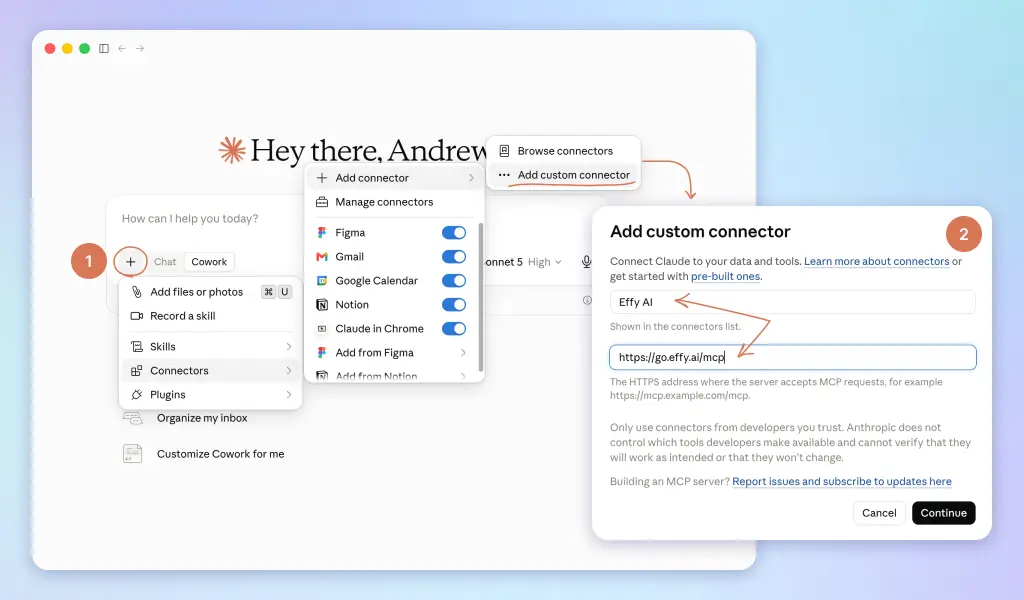
Add the Effy AI connection. Effy AI is an HR platform with a library of ready HR skills, free to use for yourself. Connected to Claude, those skills are what this course builds on: they help you set up your own workspace, your custom skills, and your context. Say "Effy, help me create a skill for onboarding" and Claude finds all the context and expertise it needs in Effy.
Two steps to connect:
1. Sign up for a free account. No credit card, nothing to set up. Name and email, just so the account exists.
2. Connect it to Claude:
→ On a personal Claude plan: open Connectors in settings, add Effy AI + https://go.effy.ai/mcp, and approve the access.
→ On Team or Enterprise, your admin controls which connectors you can add. Send them this, then connect as above once it's allowed:
Could you enable the Effy AI (https://go.effy.ai/mcp) connector with our Claude workspace? It's a HR tools and skills library I'll use for People work.
Using ChatGPT or Copilot instead of Claude? They connect tools their own way, through their own guides. Step-by-step instructions for both will be added here soon.
Do this before you build anything of your own. Feel the value first, then invest in setup. Building custom skills on day one is how people burn a weekend and quit.
Then connect your tools.
Gmail or Outlook first. It's the single biggest win, and Step 2 doesn't work without it.
Google Drive, OneDrive, or SharePoint next. Wherever the handbook, the policies, and the pay sheets actually live. This becomes Claude's reference shelf.
After that, anything else holding information Claude will need. Slack or Teams. Notion or Confluence. Your calendar.
One note if you're on Team or Enterprise: your admin controls which plugins and connectors you can install. If something's missing, that's a request to send, not a dead end.
Step 2: Tell it who you are
Settings, then General. Two moves here, and the second one is the whole lesson.
Set your work type to Human resources. One click. It points Claude at HR context and surfaces the right skills.
Then there's a box called "Instructions for Claude."
This is your standing note. It applies to every Chat and every Cowork session you ever run. No other box in the product pays back this well.
And you should not write it yourself.
Not because you can't. Because what you type into an empty box is always generic. You'll write "I'm an HR leader at a fast-growing company, be professional and concise," and that describes forty thousand people.
Claude already has access to how you actually write. Let it do the work.
With Gmail or Outlook connected, open a Cowork task and paste this:
I'm setting up my account-wide "Instructions for Claude." First, read my recent email and any connected tools (calendar, Drive, Slack) to learn who I am, my company and role, how I write, who I work with, and what I care about. Then ask me 6-8 questions, one at a time, to check what you found and fill the gaps. Finally, write a short "Instructions for Claude" note, in second person, under 250 words, that I can paste straight into Settings. Cover: who I am and my company; how I want you to talk to me; my hard rules (including "take out employee names unless I paste them in"); and things you should never do. No intro. Just the note.
Answer the questions honestly. Especially the ones about what you don't want it doing.
Then copy the result into Settings, General, Instructions for Claude.
You now have a personal setup you didn't have to write, built from evidence instead of from how you'd describe yourself on a good day.
Read it before you paste it, and have anything wrong redone. It's about to shape every answer you get.
Step 3: Your HR AI usage policy
It's 6pm and you paste last cycle's ratings export into Claude for a quick summary by team. Fast job, nobody's watching, you're tired.
Three weeks later that summary is pasted into a deck. The deck goes to four managers. And in the second paragraph, sitting there in plain text, is a real name next to a real rating.
Nothing was hacked. No policy was breached. You just moved quickly on a Tuesday.
So before you automate anything, you write down where the lines are. Not as a disclaimer slide nobody reads. As the thing that lets you automate aggressively, because you know exactly what's out of bounds.
The four rules
You met these in Lesson 1-1. Now they get teeth.
Rule 1: Use a paid plan, and know your data policy.
On Claude's paid plans, your work isn't used to train models by default. That's the baseline that makes everything else discussable.
If you're rolling this out for a team, talk to whoever owns data and security before you load real employee records, and read Anthropic's usage policy so you're answering questions from knowledge, not hope.
On Team or Enterprise, some of this is already decided: your admin controls connectors, and your org's data agreement covers what you do inside it. Ask. A short conversation now saves a very bad meeting later.
Rule 2: Take the names out when you can.
For most HR tasks, Claude doesn't need to know who anyone is. A policy draft, a survey design, a JD, a review-form redesign: "Employee A" and "Manager B" work fine.
You already wired this rule in. It's in the Instructions for Claude you built in Step 2.
That's the pattern for every rule here. Don't rely on remembering. Write it where Claude reads it every time.
Rule 3: Claude is not your employment lawyer.
It's excellent at first drafts of policies, letters, and process docs. It is not a source of legal truth. Employment law changes by country, state, and city, and a confident paragraph is not a compliant one.
Anything legal, pay-compliance, or termination-related goes to a qualified human before it goes out. No exceptions, including the ones that feel obvious.
Rule 4: Keep the send button in your hands.
Claude prepares the email, the report, the letter. You decide what actually goes out. This one rule converts almost every risk from "incident" to "caught in review."
The failure modes worth knowing by name
Rules cover what you control. These are the ways the tool itself can fail you, and each one has a defense.
Confident hallucination. Asked about your PTO policy, Claude would rather produce a plausible answer than admit the handbook doesn't say.
The defense is a standing instruction: answer only from our policies, and name the policy. If the policy doesn't say, say so and route it to me. Don't guess.
Citations aren't decoration. They're the difference between a knowledge base and a rumor mill.
Bias amplification. Ask Claude to screen resumes against "what our best people look like" and it will faithfully learn every bias in that pattern.
The defense: write the rubric before the screening, screen against the rubric, and never let "culture fit" be a scoreable criterion.
AI doesn't introduce bias into hiring. It industrializes whatever bias you hand it.
Stale data, fresh confidence. An org chart from before the reorg. Pay bands from last year. Claude will use them as if they were true, because to Claude they are.
The defense is the workspace discipline you'll build in Lesson 1-3: one source of truth in a connector, pointers instead of copies, and a monthly five-minute freshness check. An old file is worse than none.
The benchmarking trap. AIHR tested Claude on compensation benchmarking and found it usable for rough orientation on junior roles, and unreliable exactly at senior levels, where offers are largest and pay-equity stakes are highest.
Get the numbers from a dedicated comp platform.
What never gets automated
Some things stay manual not because Claude can't draft them, but because the act itself is the point.
→ Termination decisions and conversations. Claude can help you prepare. A human decides, and a human sits in the room.
→ Final performance ratings. Synthesis, summaries, gap-flagging, yes. The rating itself is a judgment you sign.
→ Legal and compliance sign-off. Rule 3, always.
→ Anything where the employee deserves a person. A bereavement response. A harassment complaint. If receiving it from a machine would be an insult, it doesn't get sent by one.
The principle behind the whole list, and the sentence worth memorizing from this course: automate the prep, not the decision.
Every scheduled task you build in Lesson 1-4 stops at a draft for exactly this reason.
Now write it down
Everything above is your judgment as of today. The moment a second person on your team touches Claude, judgment has to become policy.
Make a folder on your computer called Claude-HR. This is the folder Claude will read before every task, and for now it holds exactly one file: the policy you're about to write.
You won't write it from a blank page, and you won't paste a long prompt either. This is what the Effy AI connection from Step 1 is for. The method lives in Effy: it asks where your people sit first, because the legal floor genuinely differs between US state law and GDPR plus the EU AI Act, then interviews you and writes the policy in your language.
Make sure Effy AI is connected (instructions at the begining), start a Cowork task and ask:
Effy, draft me an AI usage policy.
Answer the questions, one at a time, honestly.
Then check the [REVIEW] markers before you call it done. Each one is a conversation with legal, a DPO, or leadership, not a formality.
It's a living document. When a new failure mode teaches you a rule, it goes in the policy the same week.
Step 4: Make Claude actually read it
A file in a folder does nothing by itself. Claude has to be told it exists.
That's what global Cowork instructions are for. In the desktop app: Settings → Cowork → Global instructions. Paste:
Before every task, read ai-usage-policy.md. It sets how you must work with me, including what data may be entered and what needs human review. Never read OUTPUTS/ unless I point you to a file. Save all deliverables in OUTPUTS/ in a subfolder named after the project. Never put real employee names in an output unless I paste them in. If a task touches pay, ratings, or anything legal, tell me who must
review it before it goes out. If the brief is unclear, ask me. Don't fill gaps with filler.
Notice what this quietly sets up alongside the reading rule: an OUTPUTS folder, organized by project, where every deliverable lands. You don't create it, Claude does, the first time it saves something. Your Claude work stops scattering across the desktop on day one.
And notice the bigger thing. Your rules now enforce themselves. You will forget them on a Tuesday at 6pm. Claude won't.
Where you are now
You have a paid account, the desktop app, working HR skills you didn't build, and your email and files connected. Claude knows who you are and how you write.
And you can now say precisely what most HR teams can't: what goes into the AI, what never does, what requires a human, and why. Written down, in a folder Claude reads before every task.
What you have is a starter folder. What you don't have yet is a workspace: a structure for your whole HR operation that Claude can navigate on its own. It knows you and it knows the rules. It doesn't yet know how your company works.
Up next
→ How to organize context files. Turn the starter folder into a workspace Claude navigates on its own.