

By the end of Basic setup, identity and your AI policy you had a starter folder: your AI policy, read before every task, plus an account that knows how you write. That's enough for Claude to sound like you and stay inside the lines.
It's not enough for Claude to run parts of your job. For that it needs to know how your company works, and it needs to find things on its own, without you pointing at files. This lesson turns your folder into a workspace.
One principle carries the whole lesson, and it comes straight from Anthropic's engineering team: Claude's attention is a budget. It can hold only so much at once, so the goal is the smallest set of high-signal information that does the job.
Their second finding matters just as much. Claude navigates the way people do. Folder names, file names, and structure are all signals it reads. A tidy workspace isn't aesthetics. It's instructions.
So this lesson is not "upload everything." It's the opposite. Right things, right places, a map at every door.
The structure
Here's a workspace layout that works, adapted from how AI-native companies organize theirs. One top-level folder, one subfolder per domain, and a README.md in every folder. That last one is the part people skip.
HR-CONTEXT-FOR-AI/
├── README.md ← the front door: what lives where, how to work here
├── ai-usage-policy.md ← from the setup lesson: the rules, read before every task
├── company/
│ ├── README.md
│ ├── org-basics.md ← size, locations, teams, who owns what
│ ├── hr-calendar.md ← review cycles, survey cadence, comp review dates
│ ├── decision-log.md ← HR decisions made, with dates and reasons
│ └── policies-index.md ← POINTERS to policies in Drive, never copies
├── processes/
│ ├── README.md
│ ├── review-cycle.md ← how your cycle actually runs, step by step
│ ├── hiring.md ← stages, who interviews, how offers get approved
│ └── onboarding.md ← the standard plan, day one to day 90
├── OUTPUTS/
│ └── README.md ← deliverables land here, one subfolder per project
└── logs/
├── README.md
├── context-log.md ← what changed in this workspace, and when
├── feedback-log.md ← what you corrected Claude on, and what's true
└── context-reviews/ ← the weekly review lands here
Why each piece earns its place:
→ README in every folder. Claude reads the README first, the way a new hire reads the door sign. Each one answers three questions: what lives here, when to read it, when to write here. The top-level README is the map of the whole workspace. Without it, you have a pile, not a workspace.
→ company/ holds facts, processes/ holds how things run. Facts change rarely and get referenced constantly. Processes are what Claude follows when it works. Separating them keeps both short.
→ policies-index.md is pointers, not copies. Your handbook lives in Drive, connected during Basic setup, identity and your AI policy. The index tells Claude what exists and where. One source of truth, nothing to drift stale.
→ decision-log.md is the file nobody thinks to create. "We decided in March that contractors don't get review cycles, because X." Without it, Claude re-litigates settled questions. With it, decisions stay decided.
→ logs/ is how the workspace learns. context-log.md is a line per change, so when something breaks in three months you'll know what moved. feedback-log.md is a line per correction, and it's the raw material for the weekly review at the end of this lesson.
The rooms
Files are half the workspace. The other half is project rooms, one per HR job, as Understanding Claude promised: Review Cycle, Handbook & Policy, Pay, Hiring, Onboarding, Surveys, HR Helpdesk.
Each room gets three things. What to upload, meaning this cycle's evidence: exports, candidate files. Instructions, meaning the rules for that job: "take out names," "answer only from our policies and name the policy." And memory, meaning facts Claude should keep: "our scale is 1 to 5, cycles run July and January."
The routing rule from Understanding Claude now has somewhere to point. A method becomes a skill. A reference stays in Drive, indexed in policies-index.md. A fact about the company goes in company/. Only project-specific evidence gets uploaded into a room.
And a note on where methods come from, because you now have two sources. Effy ships ready HR playbooks, free to any user, so your AI has the expertise before you've written anything. Your own Claude skills are where your specifics live. The path between them: run an Effy playbook, correct it until it matches how your company works, and save the result as your own skill. That's From ready prompts to work that runs itself.
And never one giant "HR" project. Mixed context degrades every task it touches.
The prompt that builds it for you
You could create all of this by hand. Don't. And you don't need to write a long prompt either. The method lives in Effy's HR skills library, free to any user, and with your email, your files, and Effy connected, Claude already knows more about your company than any blank template does.
If you skipped the Effy AI connection in Basic setup, identity and your AI policy, add it now.
1. Sign up for a free account. No credit card, nothing to set up. Name and email, just so the account exists.
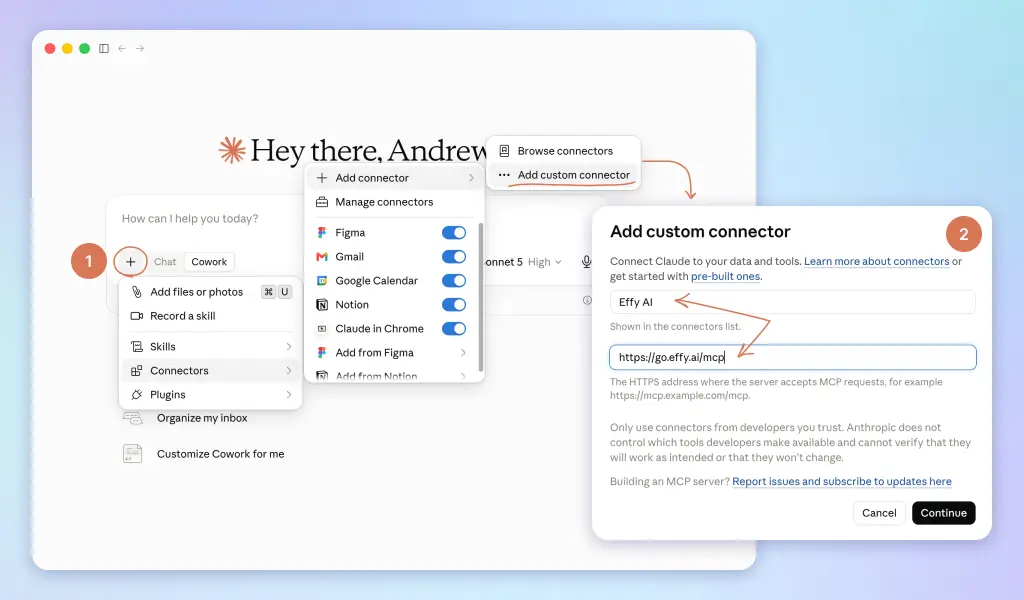
2. Connect it to Claude:
→ On a personal Claude plan: open Connectors in settings, add Effy AI + https://go.effy.ai/mcp, and approve the access.
→ On Team or Enterprise, your admin controls which connectors you can add. Send them this, then connect as above once it's allowed:
Could you enable the Effy AI (https://go.effy.ai/mcp) connector with our Claude workspace? It's a HR tools and skills library I'll use for People work.
Using ChatGPT or Copilot instead of Claude? They connect tools their own way, through their own guides. Step-by-step instructions for both will be added here soon.
Then start a Cowork task in your HR-CONTEXT-FOR-AI folder and ask:
Effy, help me build hr context files for ai.
Effy's playbook walks Claude through the same method every time. Research first: your recent email, calendar, Drive, and what Effy already knows about your company. Then an interview, one question at a time, to confirm what it found and fill the gaps. Then the build: the structure above, a README in every folder, and a project pack for each of your rooms.
Two things about that method are worth noticing, because they're habits, not one-offs.
Every inference gets marked [CONFIRMED] or [GUESS: verify]. You review the guesses, and the workspace starts honest.
And Claude shows you the plan before it builds. That's the same instinct as your AI policy, applied at scale: the human sees it before it's finished, not after.
The project packs land in OUTPUTS because Claude can't create rooms in the app for you. Creating each project and pasting its pack takes you about ten minutes, once.
The weekly context review (optional)
A workspace is a document about a living company, and companies move. Headcount changes. A process quietly evolves. A rule you learned the hard way last cycle never makes it into a file. And an old file is worse than none: it's wrong, with confidence.
You could rely on remembering to check for that. You won't. Week one, the workspace is sharp. Week six, you're correcting the same thing for the fourth time and it hasn't occurred to you that the correction is the point.
Because every correction you type is information about a gap. "No, our cycle runs July, not January." "Take the contractors out of that count." "We stopped running calibration meetings in March." Each one is a file that should have said something and didn't.
Right now that information evaporates the moment you close the task.
So you put a review on a clock. From ready prompts to work that runs itself covers scheduled tasks properly, but this one is worth setting up while the workspace is fresh in your head, and it's the single task that makes every other task better over time.
The honest catch first. A scheduled task can read your workspace, your OUTPUTS/ folder, your email and your calendar. It cannot go back and read your Claude conversations from the week. There's no shelf of old chats for it to pull from.
So you give it one. Two lines of housekeeping, and the review has something real to work with:
→ logs/feedback-log.md. When you correct Claude on something that isn't a one-off, drop a line in. Date, what it got wrong, what's true. Ten seconds, and it's the highest-value file in the workspace.→ Everything lands in OUTPUTS/, which your global instructions from Basic setup, identity and your AI policy already enforce. The review reads what you actually produced, not what you meant to.
Then create the task. In the desktop app: Settings → Scheduled tasks → New. Weekly, Friday afternoon or Monday morning, whichever you'll actually read.
Weekly context review of my HR workspace. Step 1. Learn the workspace first. Read the top-level README, then the README in each folder. Don't assume a layout: work with the structure and file names that are actually here. Step 2. Establish the period. Find your most recent review in the
reviews folder the READMEs point to. Everything since that date is this period. If there's no previous review, take the last 7 days. Step 3. Read what the period left behind: the feedback log (my corrections), the change log, every deliverable added to the outputs folder since the last run, and the context files themselves, plus my email and calendar for the same period. Then answer four questions, in this order, in under 400 words total.
1. Corrections. What did I correct since the last run, and which file should have prevented each one? Name the file and the exact line to add.
2. Gaps. What did you have to guess at, because the workspace doesn't say? List up to 5, most expensive first.
3. Drift. Anything in the context files that contradicts what you saw in this period's deliverables, my email, or my calendar. Quote both sides.
4. Bloat. Any file over 2,000 words, or any file nothing has referenced since the last review. Propose what to cut, not just what's long.
Rules. Propose edits, don't make them. Show me the exact wording you'd add or remove so I can approve it in one read. If the period was quiet and there's nothing worth changing, say "nothing this week" and stop. Don't manufacture findings. No employee names. Save the review next to the previous ones, named YYYY-MM-DD.md, and message me.
Four things about this prompt are load-bearing.
It proposes, you approve. A task that edits your context files on its own will eventually write a wrong rule into the place Claude trusts most. Automate the prep, not the decision, applies to the workspace itself.
It asks for the exact wording. "Your review-cycle.md is incomplete" costs you twenty minutes. "Add this line to review-cycle.md, after line 12" costs you ten seconds and a yes.
It's allowed to say nothing. Without that line, you'll get five invented findings every Friday, and you'll stop reading it by week three. A review that can return empty is a review you trust when it isn't.
It ranks gaps by cost, not by count. Twelve missing details don't matter equally. The one that made Claude guess at your comp philosophy matters more than a missing office address.
Give it a month. What you'll notice is that the corrections stop repeating, because they stopped being corrections and became files.
That's the difference between a workspace you maintain and one that maintains itself.
You now have a workspace Claude can navigate on its own, and a review that keeps it honest. From ready prompts to work that runs itself is where you stop driving it: turning the prompts you've been pasting into your own skills, and putting the rest of your week on a clock.
Up next
→ From ready prompts to autopilot. Your own skills, your own scheduled tasks, and the adoption ladder.