Three places where AI makes your review cycle better: sharper questions built from last cycle's answers, reviews from employees and managers that carry evidence, and results analysed before calibration.
Run a better review cycle
For HR teams, review season means a lot of preparation and a lot of work. Rebuilding the forms. Chasing people. Reading hundreds of answers. Building the calibration pack by hand.
Everyone in the cycle is already using AI. HR, managers, employees. But "generate review questions" gets you the same form every other company has. And "write my review" gets you four paragraphs with nothing in them.
Here are the three places where AI can improve both the experience of your review cycle and its results:
→ The questions. Improve next cycle's form using last cycle's answers.
→ The writing. Help employees and managers write reviews that carry evidence.
→ Calibration and reporting. Analyse the responses to find calibration signals, and build the final reports and dashboards.
Before you start
Get Effy AI's free skill library inside the AI assistant you already use: ChatGPT, Claude or Copilot.
It has HR skills for much more than this article. Your assistant can use them whenever you ask. And you can change any skill to fit how your company works.
Two steps:
- Sign up for a free account.
- Connect Effy AI to your assistant:
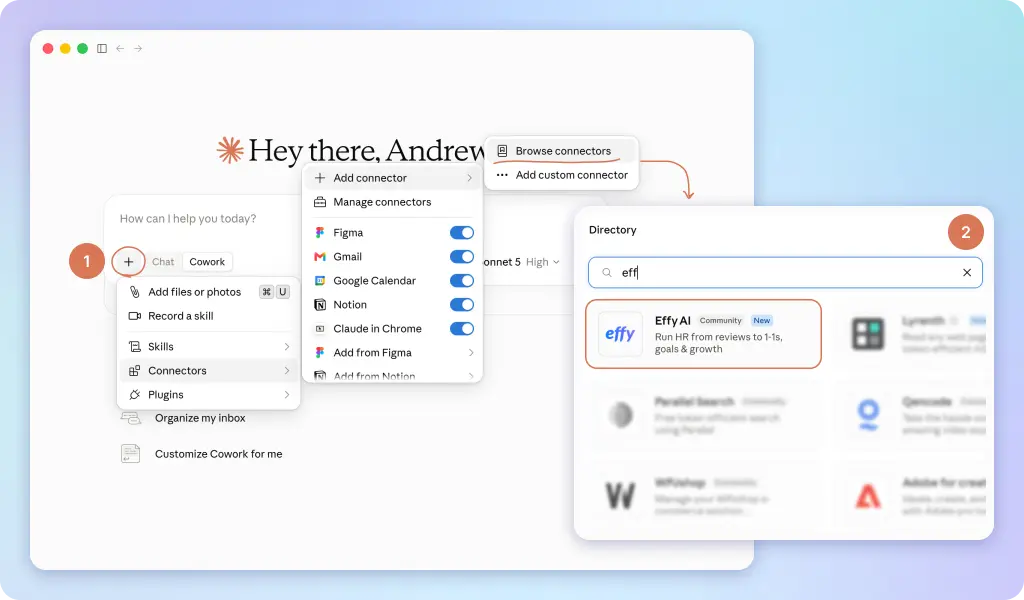
Then just write "Effy, help me..." and your assistant finds the right skill and follows it.
1. Questions built from last cycle, not from scratch
The best source for next cycle's questions is last cycle's answers.
Most companies already have that data. Two or three past cycles, sitting in the performance tool. Asking AI to "generate questions" throws all of it away and starts from a generic template.
So don't. Give it last cycle's form and, if you have them, the answers. Then ask what to change.
To get the answers, export last cycle from your performance tool as a spreadsheet or CSV. Delete the names if your AI policy requires it. It only needs the questions and answers.
There are two ways to run it.
If Effy AI is already connected to Claude, ChatGPT or Copilot, open your assistant, attach last cycle's form and the answers if you have them, and write:
Effy, use your skill to build our review form. I've attached last cycle's form and responses.
If you haven't connected Effy and want to try it first, open the prompt. Paste it into your assistant, attach the same files, and follow the instructions.
How it works. If you attached the answers, it starts there. For every question it looks across all the responses: how long the answers are, how much they actually say, and how many carry an example or evidence. A question most people answer in one line isn't collecting information. It's a box people tick.
Then it reads the wording of each question and flags what invites a vague answer. "How did this person demonstrate ownership and collaboration?" is two questions with nothing to anchor them, and it will tell you so.
Finally it suggests changes. Better wording for the questions you keep, and if you want, a rebuilt form that fits your company culture and what last cycle's data showed. Each change tied to something it found, so you can argue with the reasoning instead of the taste.
2. Reviews that carry evidence
Employees and managers already use AI to write their reviews. That won't change, and it shouldn't.
The problem is what they get without guidance: longer text, fewer examples, and reviews that all sound the same. That makes the analysis afterwards close to useless.
So HR should lead. Give people a prompt that does three things in order:
→ looks through their own connected tools first: email, calendar, Slack or Teams, docs, the project tracker, meeting notes→ shows them what it found and asks what's missing or wrong→ only then drafts, short, with the evidence in it
That saves them the hour of scrolling back through six months of messages. And it gives you reviews with something in them.
The privacy part. This runs in each person's own AI account, on their own data. HR never sees anyone's inbox. Nothing leaves their account until they paste the answer into the review form themselves. Say this in your rollout message, because it's the first question you'll get.
If you've connected Effy AI, put this into your AI assistant and attach the questions you'll use in this cycle:
Effy, please help me create a prompt for review participants to help them draft their reviews. I've attached the questions for our review cycle. Give me the prompt as a .md file I can share.
Otherwise, here's the prompt. Paste in your review questions in the last section, and share it with your review participants. They put it into their Claude, ChatGPT or other assistant and get an evidence-based draft of their review.
3. Calibration and reporting from the results
Get the calibration pack ready before the meeting, not the night before it.
This is where most of HR's cycle time goes. Fifty people, three reviews each, a spreadsheet, and you trying to spot which manager rated everyone a five.
Export the cycle's responses: ratings and comments, who wrote each one (self, manager, peer), and the manager, team, level and tenure. Replace names with codes if your AI policy requires it.
If you've connected Effy AI, attach the export and write:
Effy, please analyze all the collected review responses. I've attached them in the file.
Otherwise, here's the prompt to use in your AI assistant, with the same file attached.
How it works. It looks at the results from more than a dozen angles, and calculates each one from the file instead of guessing:
→ lenient and strict managers, and managers who gave everyone the same rating→ gaps between self, peer and manager ratings→ high ratings with critical comments, and the other way round→ low performers with no next step, and high performers who say they're stuck→ questions that produced little usable text
Each finding comes with the numbers and a plain-language line under them. You get two things out of it.
For calibration: the five findings that matter most, and a list of managers to talk to before the meeting, with the reason for each.
For reporting: the same analysis as a document for leadership, or as an interactive dashboard you can filter by team. Ask for the format you need.
These are flags, not verdicts. A manager with high averages might simply have a strong team. The analysis tells you where to look. You still have to look.
If the results feed pay or promotion decisions, have someone qualified check the process first. EU law treats using AI to evaluate employees as high risk, and pay rules differ by country. The skill is built so the AI flags and people decide. AI is not your employment lawyer, and neither is this article.
What's next
I keep updating these skills as I learn from real review cycles. Here's how to stay close to that.
→ Get them free. Sign up for Effy AI and connect it to your assistant. You'll always have the latest version, plus every other HR skill in the library.
→ Let's connect on LinkedIn. Here's my profile. It's the easiest way to see new skills as I publish them.
→ Questions about the skills or Effy AI? Message me on LinkedIn or book a call. I'm happy to help you adapt them to your cycle.
Click. Try. Use.
Thank you! Your submission has been received!
Oops! Something went wrong while submitting the form.