

It's Thursday. The offer just came back signed, your twelfth hire, and you're happy for exactly four minutes.
Then you open the onboarding checklist from last time. It was built for a sales role. Half the links point at documents that have moved. The IT section still names a tool you switched off in March.
So you do what you did the last eleven times. You rebuild it from memory. And memory is how a laptop doesn't get ordered, and how someone spends their first morning watching other people work.
Now think about how you'd fix this with a person. If a new teammate were taking over onboarding from you, you wouldn't hand them that checklist and walk away. You'd sit down and explain the process around it: who does what, in what order, which tools you use, where the real documents live, what usually breaks and when. That explanation is what makes them able to run the process instead of just reading about it.
Claude needs the same briefing. Not because it's a teammate, it's a tool, but because it works the same way: it can only run what it knows. Explain the process once, in writing, and every lesson in this module builds on that: the plan for a specific hire, the calendar, the chasing, all generated from documents that know how your company works.
So this lesson is about creating those documents. Two of them: one describing your company's onboarding process, and one per team describing the role side. And don't worry about the writing. You won't write a line of either. Claude interviews you, reads your real evidence, and writes. You correct.
Before you start
This lesson stands on Module 1. Four things need to exist:
→ The workspace, from How to organize context files. The HR-CONTEXT-FOR-AI/ folder with company/, processes/ and logs/. Today's documents are the first big deposit into processes/.
→ The AI policy, from Basic setup, identity and your AI policy. ai-usage-policy.md at the top of the workspace. It's the rule Claude follows while building these docs, and onboarding will test it harder than anything so far.
→ Email connected, also from Basic setup, identity and your AI policy. The build starts by reading the paper trail of your past hires, and that trail lives in your inbox.
→ The Effy AI connection, from the same lesson. The method this lesson runs lives in Effy's HR skills library, free to any user. To set it up:
1. Sign up for a free account. No credit card, nothing to set up. Name and email, just so the account exists.
2. Connect it to Claude:
→ On a personal Claude plan: open Connectors in settings, add Effy AI + https://go.effy.ai/mcp, and approve the access.
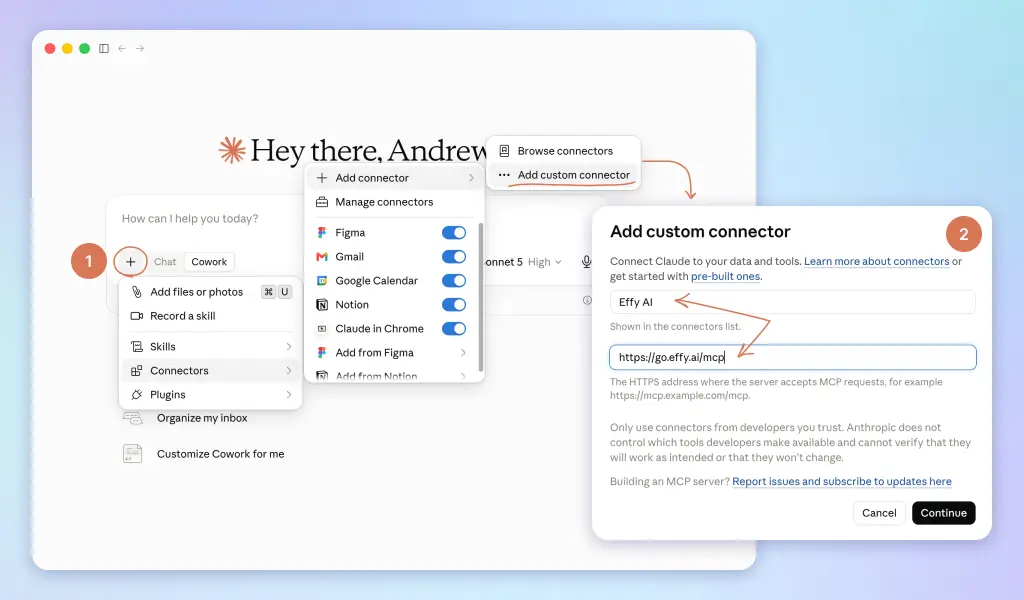
→ On Team or Enterprise, your admin controls which connectors you can add. Send them this, then connect as above once it's allowed:
Could you enable the Effy AI (https://go.effy.ai/mcp) connector with our Claude workspace? It's a HR tools and skills library I'll use for People work.
Using ChatGPT or Copilot instead of Claude? They connect tools their own way, through their own guides. Step-by-step instructions for both will be added here soon.
If any of the four is missing, go back and set it up first. It's twenty minutes, and nothing in this module works without them.
What you'll have at the end
Two documents, and it's worth seeing their shape before you build them.
First: processes/onboarding.md, the company process. Its spine is a grid: owners times timeline. Five owners:
→ You (HR or People Ops)→ The hiring manager→ The buddy→ IT, or whoever plays IT at your size→ The new hire themselves
And seven moments: offer accepted, pre-start, day 1, week 1, day 30, day 60, day 90.
Every task is one cell in that grid. "Order the laptop" is IT, pre-start. "Book the 1:1s" is the manager, pre-start. Why this shape? Because a task with an owner can be assigned, and a task with a timing can be scheduled and chased. You're not writing prose for humans to admire. You're writing structure the next two lessons will run on.
Note the timeline doesn't stop at week 1. Orientation, the accounts and paperwork part, ends there. Onboarding ends when the work is just work, around day 90, and the late columns are where most companies simply stop showing up.
Around the grid, four smaller things: links to the real documents instead of pasted copies (copies drift, Module 1's rule), the list of documents each hire gets their own copy of and where the masters live, short variant blocks for what differs by role or country, and a data note naming which steps touch sensitive personal data. ID documents, bank details, home addresses: those never go into Claude. The process around them does.
Second: processes/onboarding-[department].md, one per team that hires. The role side, written by the manager, not by you: the week-1 schedule, the people worth meeting and why, the first real task, and the 30/60/90 outline.
One line for the whole chapter: your old checklist is what to do. These documents are who, when, where, and what's different. That's the part you've been filling from memory every hire.
Building it
Claude builds the company doc in three passes: it reads the evidence, it interviews you, and it writes.
The evidence pass is what makes this work. Your last few hires left a paper trail in your email: offer confirmations, IT requests, the schedule you sent, and, most tellingly, the reminders you had to send when something was late. That trail is what you actually do, as opposed to what you'd say you do.
And because your process almost certainly has holes, the playbook carries a core skeleton: the standard steps that show up at every company that onboards well. Where your evidence runs out, Claude fills the cell from the skeleton and marks it as a suggestion. You get a complete document on the first pass, not a document with your gaps reproduced in writing.
The method lives in Effy's HR skills library, so the version you run never goes stale. Start a Cowork task with your Claude-HR folder connected and ask:
Effy, document my onboarding process.
That's it.
Two things the playbook handles that you'd otherwise worry about. It carries its own ground rules, initials instead of names and no sensitive data in the output, so the policy holds even if you forget to mention it. And if your email isn't connected, it doesn't pretend: it tells you exactly which threads to paste in instead.
Twenty minutes, most of it answering questions about your own company. You'll enjoy it more than you expect. Being interviewed about how things actually work is clarifying in a way that staring at a blank page never is.
What comes back is a complete document where every line is marked [CONFIRMED], [GUESS: verify] or [SUGGESTED], plus a short list of the guesses and suggestions to close out. Do it the same week, while the interview is fresh. A [SUGGESTED] step you keep becomes process. A [GUESS] you never verify is a small landmine with your name on it.
The department layer
Now the part most onboarding guides skip, and the part that decides whether this works past your own desk.
You can't write engineering's onboarding. You shouldn't try. What a new engineer needs in week one lives in the engineering manager's head: which systems, which people, what a realistic first task looks like, what the last hire struggled with.
The standard failure is a meeting. You interview the manager, take notes, write it up, they never review it, it's stale in a quarter.
Here's the better move: the manager gets their own prompt. They run it in their own Claude, it interviews them the same way yours interviewed you, and out comes a department doc that plugs into the company one. You never touch a draft.
Send them this, with the brackets filled in:
You're helping me, a [department] manager, document how we onboard a new [role] on my team. The company-level onboarding (contracts,
accounts, equipment, HR check-ins) is already handled elsewhere. Do not include it. Your job is the role side only.
Interview me one question at a time, eight questions at most:
- What must this person be able to do independently by day 30, 60, 90?
- What did the last person in this role struggle with in month one?
- Which tools, systems and accounts are specific to our team?
- Who are the 5 to 7 people they must meet in week one, and why each?
- What's a real, small task they could complete in week one?
- What documents or boards should they get their own copy of?
- What's the team's meeting rhythm, and what do they join from day one versus month two?
- What does falling behind at 90 days look like, so we can name it early?
Then write the department onboarding doc: the week-1 schedule, the intro meeting list with the why for each person, the first-week task, and a 30/60/90 outline where the first stretch is learning, the second is contributing, the third is owning. Mark anything you inferred [GUESS: verify]. I own the goals. You're drafting, not deciding. Format the output as a single document I can send back to HR to file next to the company process doc.
Notice what the prompt asks for. Not a checklist of tools. The five people worth meeting and why. The real first task. What the last person struggled with. That's the knowledge that never makes it into HR-written onboarding, because HR never had it.
And notice the arc built into the 30/60/90: learning, then contributing, then owning. First stretch, they absorb. Second, they ship with help. Third, they run things without you checking. Every good 90-day plan you'll ever see is some version of that shape.
The manager sends the output back. You file it as processes/onboarding-engineering.md, or sales, or support, next to the company doc. One per team that hires.
That's the whole handoff. The manager spent fifteen minutes talking. You spent zero minutes writing. And the manager's half of onboarding no longer lives in the manager's head.
Keeping it true
Two habits, both small, both borrowed from How to organize context files.
The weekly context review you put on a clock there already covers these documents: drift against your recent hiring email gets caught, with the exact edit proposed. Tools change, owners change, the doc follows.
And after every hire, whatever went wrong goes in feedback-log.md. The step that was late, the link that was dead, the question nobody could answer. In the last lesson of this module, that log becomes proposed edits to these documents. The process gets better with every hire, which is the entire point.
One thing these documents are not: a plan for an actual person. There's no name in them, no start date, no calendar. That's deliberate. The process doc is the recipe. The plan for a new hire, generated and scheduled is where you cook: one short command reads both layers and turns a signed offer into a live plan, with tasks assigned to the manager, the new hire and you, and invitations on real calendars.
That's where the time comes back.
Up next
→ Creating a plan for a new hire. One signed offer in, a scheduled plan out, nothing written from scratch.→ Running it: monitoring, chasing, and the check-ins. The watcher that keeps the middle of onboarding from going quiet.