

This lesson is the map. Where Claude lives, what it's made of, what goes where, and what it doesn't get to touch. No case studies yet, those come later. Right now you just need the vocabulary to stop feeling like vocabulary.
Five things, and what each one is for
There are five parts to learn, and the names are the hard bit, not the ideas.
So here they are in plain language before the product names arrive.
Something that lets Claude see your tools. A place to work on one job. The documents it needs there. A written-down way of doing a task. And a clock that starts the work without you.
That's the whole platform. Access, place, knowledge, method, timing.
Part 1: Where Claude lives
Claude shows up in three modes, on web, desktop, and mobile.
Chat
You type, it answers. Quick drafts, questions, thinking out loud. The ChatGPT-like experience most people have already seen.
You're in it the whole time. You steer. "Help me word this message to a manager who's about to lose someone."
Cowork
This is the one that matters for automating HR.
Cowork is Claude doing a real task for minutes or hours while you do something else. It reads your files, plans the steps, writes the output (documents, spreadsheets, decks), and asks you questions when it hits a fork in the road.
Sessions keep running in the background. Start one, close your laptop, it carries on and pings you when it needs a decision.
You're not in the conversation. You handed over a job. "Read the review exports in this folder and build a calibration summary by team."
Code
Claude in a terminal, mostly for developers.
It's the raw version. It works directly in any folder, with fewer guardrails and more control over how things are wired together. Day to day you talk to it the same way, plain language either way. "Go through the 200 offer letters in this folder, pull name, salary, level, and start date into one spreadsheet, and flag any letter missing a signature."
If you don't code, skip it. Cowork does the same job with more guardrails.
The quick test
Want a thinking partner, a back-and-forth you steer? Open a Chat.
Want a finished thing, and the work touches your files or tools? Start a Cowork task. Describe the goal, point Claude at the files, say what "done" looks like.
In one line: Chat helps you write an email. Cowork runs your whole review-comms sequence, builds the handbook, and drafts fifteen development plans while you're in a 1-1.
Part 2: The five building blocks
Claude isn't one feature. It's five parts that work together. These five are what take you from "asking Claude for help" to "Claude running parts of your job."
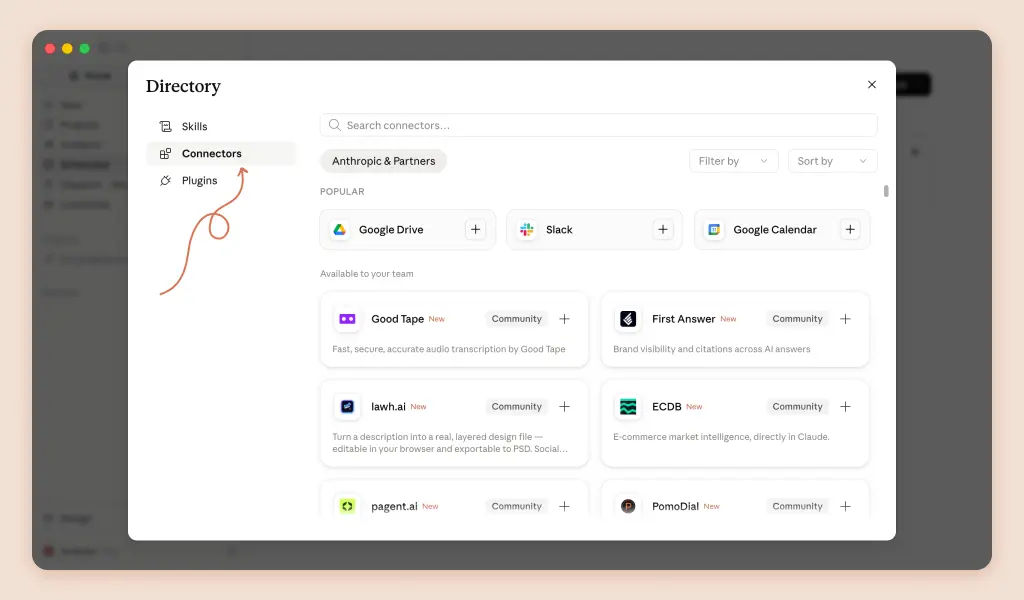
Connectors: how Claude reaches your tools
Not something you build. A connector is the link that lets Claude read from and write to a tool you already use, so everything else works on real data instead of waiting for you to paste it in.
For HR, the ones that matter:
→ Outlook/Gmail and Calendar (the endless employee and candidate email, 1-1s, cycle dates)
→ Drive or SharePoint (where the handbook and pay sheets live)
→ Slack or Teams (employee questions, announcements)
→ Notion or Confluence (your internal wiki)→ Your HRIS or ATS (headcount, roles, hiring pipeline)
Without connectors you're copy-pasting. With them, Claude just looks.
Projects: a place you go to
A project is a saved workspace that remembers a set of documents, a set of rules, and its own notes. Everything you do inside it already has that context.
Think of it as a room set up for one job you do again and again.
A "Review Cycle" room that already knows your form, your competency framework, and your comms rules. A "Hiring" room with your JD templates and scorecards. An "HR Helpdesk" room that answers only from your policies.
A project holds the documents Claude references, and the instructions for that room. Rules like "take out names," "never show individual scores in a group summary," "flag anything a lawyer should check."
You go there. That's the tell. A project is a place.
Context docs: what Claude knows about you
Plain files holding your standing knowledge, so you stop re-explaining yourself.
Some live above every project, at the top of a folder like Claude-HR/: your AI usage policy, your standards, your templates. Some live inside one room: the handbook, the pay bands, the review form, the competency framework, the org chart, past survey results.
A policy file that says "take out names, and anything touching pay or legal gets flagged for human review" gets obeyed in every task, without being asked. Once.
One trap worth naming now. If the same document keeps showing up in several rooms, don't upload copies. Copies drift, and a stale copy is wrong with confidence.
Keep one source of truth, in a connector or in a folder above the projects, and point every room at it.
Skills: a method you write down once
A skill is a procedure. A step-by-step way of doing one task, written down once, ready in every conversation.
Not knowledge. Method.
"How we turn a finished review into a 90-day plan: 2 to 3 focus areas, 2 actions each, at least one measurable, check-in dates" is a skill.
The review itself is not. That's a document.
You trigger a skill by name (/performance-review, /pdp, /1-1-prep, /handbook-update, /offer-comms) or Claude picks it up on its own when it spots the task.
Because the procedure is written down, the task comes out the same way every time. That's the whole point. Right now your development plans don't.
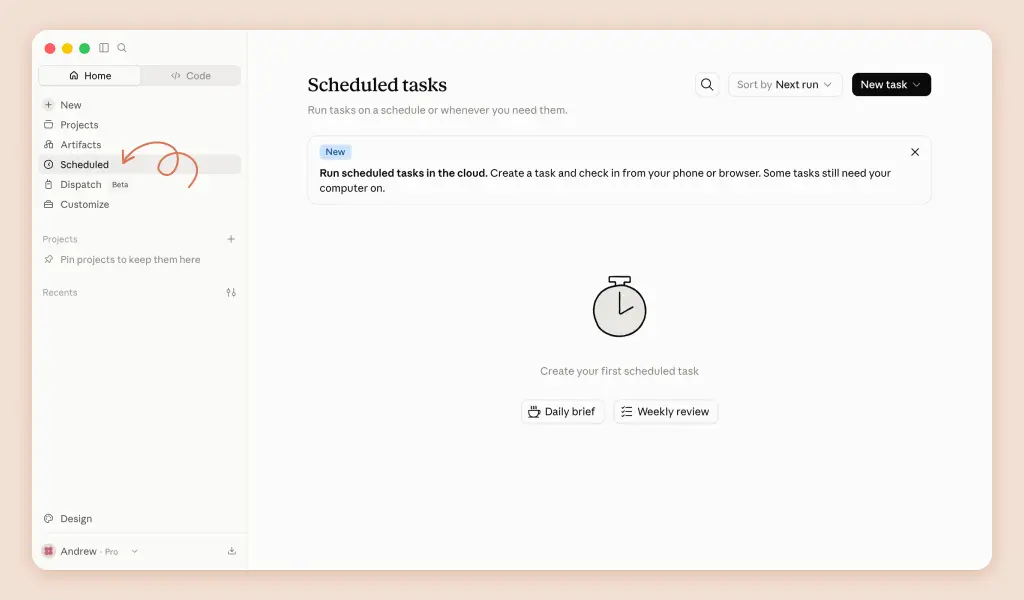
Scheduled tasks: work that runs itself
A job you set up once that Claude runs on a schedule and delivers finished, in the cloud, even with your laptop closed.
A Monday people brief. A Friday list of managers who still owe reviews.
Keep the split clean, because this one gets messy fast.
The task holds the when and the what. Schedule, scope, where to deliver. "Every Friday at 4, check review status, leave a draft nudge for me to send."
The method belongs in a skill the task calls. How to check. How to word the nudge.
If the how lives inside the task prompt, you can't reuse it anywhere else, and you'll end up maintaining two versions of the same procedure that slowly stop matching.
Plugins: blocks you install instead of build
Not a sixth block. A shortcut to the five.
A plugin is an installable bundle of skills and connectors, packaged by someone else, added in one click. One install gives you nine ready skills (/performance-review, /comp-analysis, /draft-offer, /interview-prep, /recruiting-pipeline, /onboarding, /org-planning, /people-report, /policy-lookup) and hooks up the main connectors.
Start with a plugin. Feel the value. Then add your own skills for what's missing.
A note on pricing plans: if your company is on Team or Enterprise, your admin controls which connectors and plugins you can see. Can't find the HR plugin? That's a request to your admin, not a missing feature.
One line to remember: connectors bring the data, projects hold the room, context docs hold the knowledge, skills hold the method, scheduled tasks run it on a clock. And plugins let you install the blocks instead of building them.
Part 3: What goes in a Skill, what goes in a Project
Everyone gets this wrong for about two weeks. Here's the line that fixes it.
Anthropic puts it this way: "Projects give Claude persistent context for a specific body of work… Skills teach Claude how to do something."
So: a project holds context, a skill holds a method. Knowledge versus procedure. The what lives in files inside a room. The how lives in a skill.
Two signals tell you a prompt has become a skill.
You keep typing the same instructions across different conversations. That's the moment. Stop retyping it, write it down once.
Or you keep copying the same instructions into different projects. Same signal, bigger version. If an instruction is true in three rooms, it doesn't belong in any of them.
There's a technical reason this split matters, and it's worth 30 seconds.
Skills load dynamically. Claude reads a skill's short description first, roughly a hundred words worth, and only pulls in the full instructions when the task actually matches. Files in a project are always part of that room's context, every single time.
Which means methods are cheap until needed, and reference documents are always being carried. That's why methods go in skills and documents go in projects.
One more distinction while we're here. Connectors and skills sound similar but do opposite jobs: connectors bring the data in, skills say what to do with it. You want both.
The HR translation
One worked example ties all of it together.
"How to turn a finished review into a 90-day development plan, 2 to 3 focus areas, 2 actions each, one measurable, check-in dates" is a skill (/pdp).
Your competency framework and this cycle's review exports are context docs in the Review Cycle room.
"Never put real names in outputs" is a project instruction, or better, a global one.
The review data arriving from your HRIS is a connector.
And "every Friday during the cycle, list managers who still owe reviews and draft a friendly nudge for me to check" is a scheduled task. Same skill, same room, running on a clock instead of waiting for you to ask.
Three of these get confused constantly, so hold one review season up against all three:
Project is the room. "Review Cycle" holds the form, the framework, the comms rules, and every conversation about this cycle. You go there when you work on reviews.
Skill is the recipe. /pdp describes how a development plan gets made. Steps, format, standards. It works in any room, and run inside Review Cycle it picks up that room's context.
Scheduled task is the recipe on a clock. The Friday review-chaser calls the same method without you starting it. You didn't ask. The draft is just there at 4pm.
Three questions and you'll never mix them up:
Is it a place you'd return to? Project.Is it a way of doing something? Skill.Is it a time something should happen? Scheduled task.
And the routing rule in one line: a document needed in several rooms is in the wrong place. Method goes to a skill, reference goes to one source of truth, and only project-specific evidence gets uploaded into a room.
What Claude knows about you shapes output quality more than any clever prompt will. The module on organizing context goes deep on that: the exact folder structure, the files, how rules stack.
Part 4: What HR practitioners have learned
Beyond the official guidance, the HR people who've been running Claude in production for a while converge on two things.
Run a hybrid model. Chat for judgment calls that need back-and-forth nuance. Cowork for high-volume routine work: screening summaries, review packets, reports. Dedicated tools where precision is contractual. Claude is a first-draft engine, and a human reviews before anything is final.
One room per job, not one giant room. Review Cycle, Handbook, Pay, Hiring, Onboarding, Surveys, Helpdesk. Each with its own files, instructions, and memory. Mixing them degrades all of them.
Part 5: The data rules
You handle the most sensitive data in the company. Pay, performance, health, complaints.
Four non-negotiables.
1. Use a paid plan, and know your data policy. On consumer and Team/Enterprise plans your work isn't used to train models by default. Rolling this out for a team? Check with whoever owns data and security first, and read Anthropic's Usage Policy.
2. Take the names out when you can. For most tasks, policies, surveys, JDs, Claude doesn't need real names. "Employee A / Manager B" works fine.
3. Claude is not your employment lawyer. Great for first drafts of policies, letters, process. Not a source of legal truth. Employment law changes by country, state, and city. Anything legal, pay-compliance, or termination-related goes to a human expert before it goes out.
4. Keep the send button in your hands. Claude prepares the email, the report, the letter. You decide what actually leaves the building.
These four get their teeth in the next lesson, where you set the account up properly: the plugin, the connectors, your instructions, and the rules written where Claude reads them before every task. That's Lesson 1-2, and it's about an hour.
Up next
→ Basic setup, identity and AI policy. The hour that makes Claude sound like you and stay inside your rules.
→ How to organize context files. Turn a starter folder into a workspace Claude navigates on its own.
→ From ready prompts to autopilot. Your own skills, your own scheduled tasks, and the adoption ladder.